

The Platform That Evolves with Your Business
The tools your team needs today. The intelligence your operation demands tomorrow.
Built for busy field teams


Control the operation
from your desk
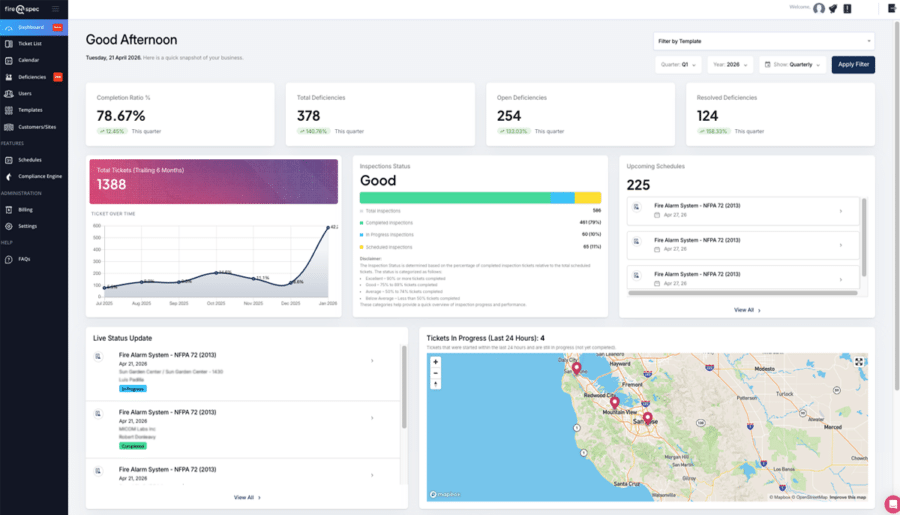
Keep field work moving without chasing updates. Manage scheduling, templates, deficiencies, and reporting from one place so your team stays organized and stakeholders stay informed.
- Create and assign jobs; manage calendars and crews.
- Build and update checklists and templates.
- Track deficiencies from first note to resolved.
- Monitor progress and export what stakeholders need.


Made for the job site
Built for technicians in the field, fireNspec makes inspections faster, clearer, and easier to complete under real job site conditions. Capture results, photos, comments, and asset data on the go, with offline capability that keeps work moving even when connectivity does not.
- Work offline; everything syncs when you’re back online.
- Log inspection results, deficiencies, photos, and comments.
- Scan barcodes to pull asset details fast.
- Keep crews aligned with task updates and notifications.


fireNspec - the complete workflow solution

Assign jobs, avoid conflicts, and keep inspectors in the loop with automatic reminders.

Assign jobs, avoid conflicts, and keep inspectors in the loop with automatic reminders.

Assign jobs, avoid conflicts, and keep inspectors in the loop with automatic reminders.

Assign jobs, avoid conflicts, and keep inspectors in the loop with automatic reminders.

Assign jobs, avoid conflicts, and keep inspectors in the loop with automatic reminders.

Assign jobs, avoid conflicts, and keep inspectors in the loop with automatic reminders.