

Schedule Smarter. Deploy Faster. Keep Every Inspection Moving
fireNspec makes it easy to schedule inspections, assign the right technicians, and keep every job moving from start to finish.

Built for Real-World Team Coordination
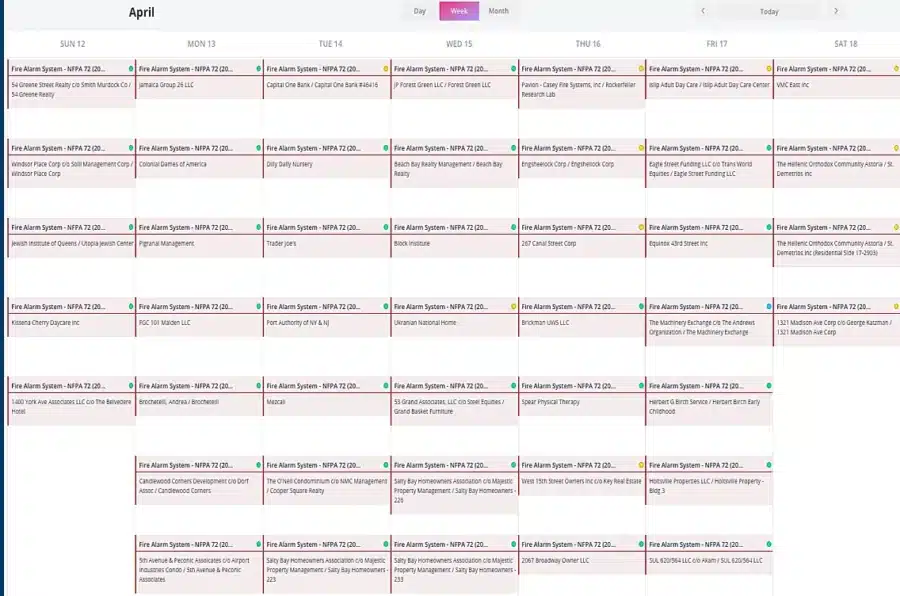
With flexible calendar tools, repeat scheduling, and multi-technician support, fireNspec helps you coordinate inspections efficiently while giving your field teams the information they need to stay productive.
- Create inspection tickets from the Dashboard or Calendar
- Schedule one-time or repeating inspections
- Choose all-day events or specific start times
- Filter by team, technician, template, status, location, or date
Real-Time Visibility Into Every Ticket
Each ticket in fireNspec contains the information needed to perform and manage an inspection, including scheduled date, site, assigned technician(s), status, time log, device list, comments, photos, and inspection report. Admins can follow progress in real time, communicate with technicians through ticket chat, and see how many devices have been completed out of the total inspection scope.

Assign Multiple Technicians to One Ticket
Many inspections require more than one technician, especially on larger sites, complex systems, or high-device-count jobs. fireNspec supports real collaboration by allowing multiple technicians to work in the same inspection simultaneously. They can view each other’s progress in real-time as the inspection proceeds.

Notifications Help Your Team
Instead of relying on manual follow-ups, fireNspec keeps everyone aligned automatically throughout the scheduling process.


